Feedback across multiple channels
Comments sit in email threads, chat messages and marked-up files that rarely agree with each other.
Document review & approval software · One-time packages · Digital delivery
Document Review & Approval Software
ApproveTrail gives freelancers, consultants, creative professionals and small teams a clearer way to organise document reviews, gather reviewer feedback, track approval status and keep a tidy record of every version.
View Software Packages Explore Features
Operated by Tilak Giri · Independent UK sole trader
 Document records
Reviewer feedback
Approval status
Document records
Reviewer feedback
Approval status
The problem
Comments arrive by email, chat and marked-up files, and it becomes hard to remember who reviewed what and which version is current. ApproveTrail brings the everyday parts of a review into one structured place.
Comments sit in email threads, chat messages and marked-up files that rarely agree with each other.
It is difficult to tell at a glance whether a document is still under review or already approved.
Several versions of the same document circulate, and the current one is not always obvious.
Changes are made between versions without any note explaining what was updated or why.
It is easy to lose track of who was asked to review a document and who has responded.
Finding what was agreed on a document months ago means searching old emails and folders.
Benefits
Every ApproveTrail package is built around the same practical set of review and approval tools.
Titles, owners, categories and related files kept together in one record.
Send a document for review with a clear list of the reviewers involved.
Collect comments and requested changes against each document in one place.
Move documents through draft, under review, changes requested and approved.
Keep a record of each document version as it moves through revisions.
Add a short note describing what changed between one version and the next.
Record the date a review or approval is needed by.
Find documents by title, reviewer, status, deadline or category.
Summarise completed approvals by document, reviewer or period where the package supports it.
Product preview
Interface previews are illustrative and may vary according to the selected package and delivered software version.
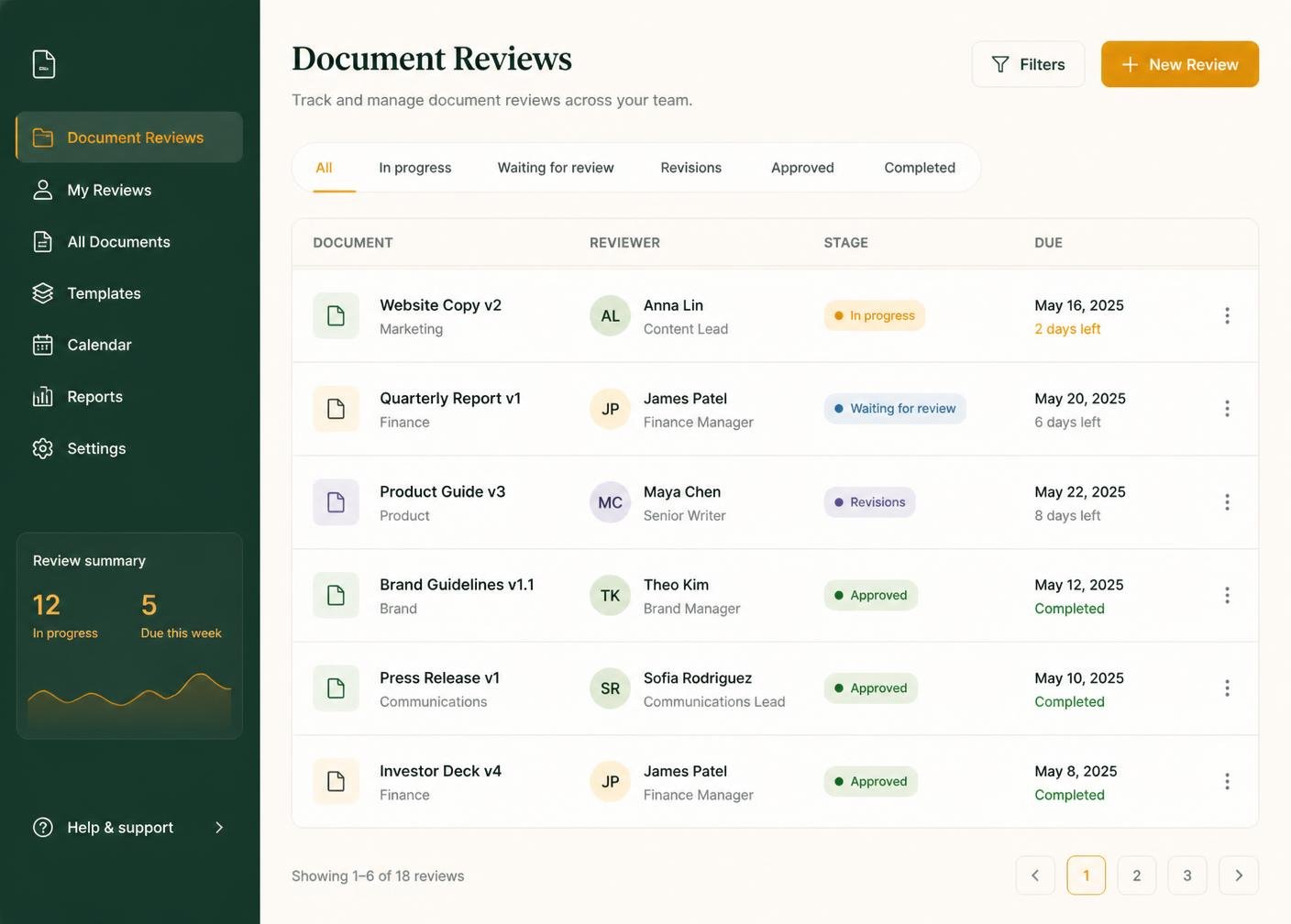
An overview of active reviews, pending feedback and approval counts in one screen.
Illustrative software preview · demonstration data
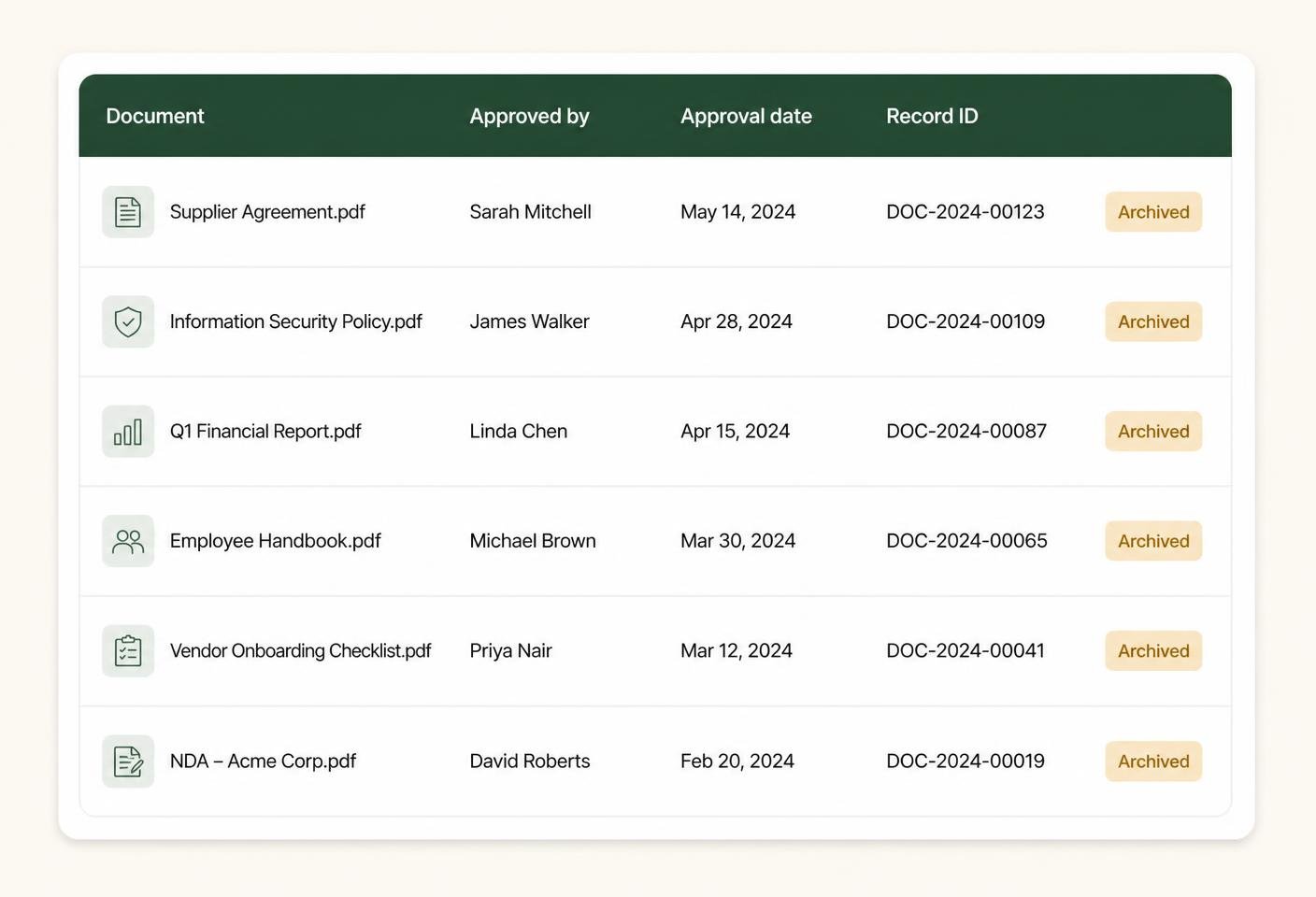
Document records with titles, owners, versions and current review status.
Illustrative software preview · demonstration data
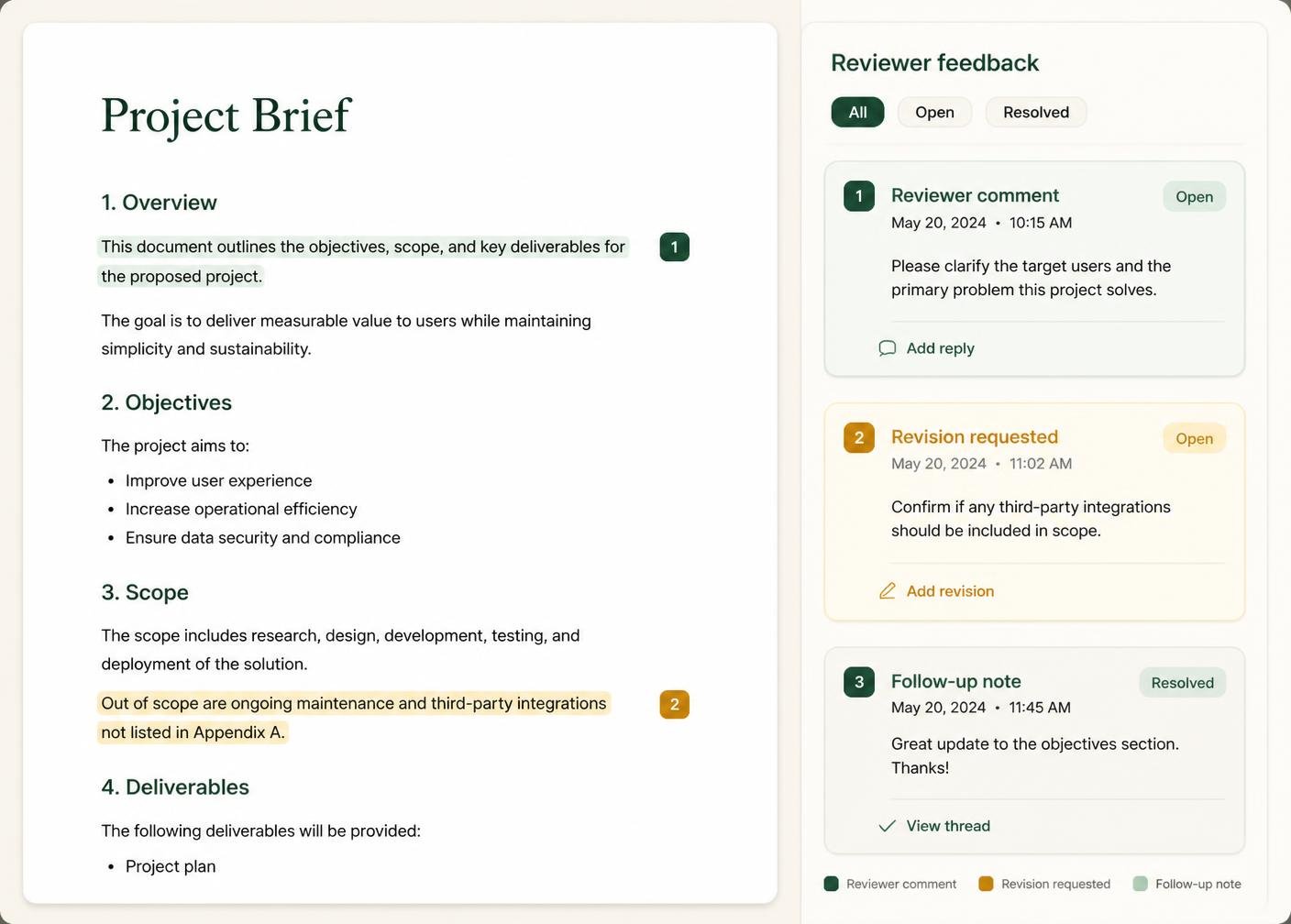
Reviewer comments and requested changes gathered against each document.
Illustrative software preview · demonstration data
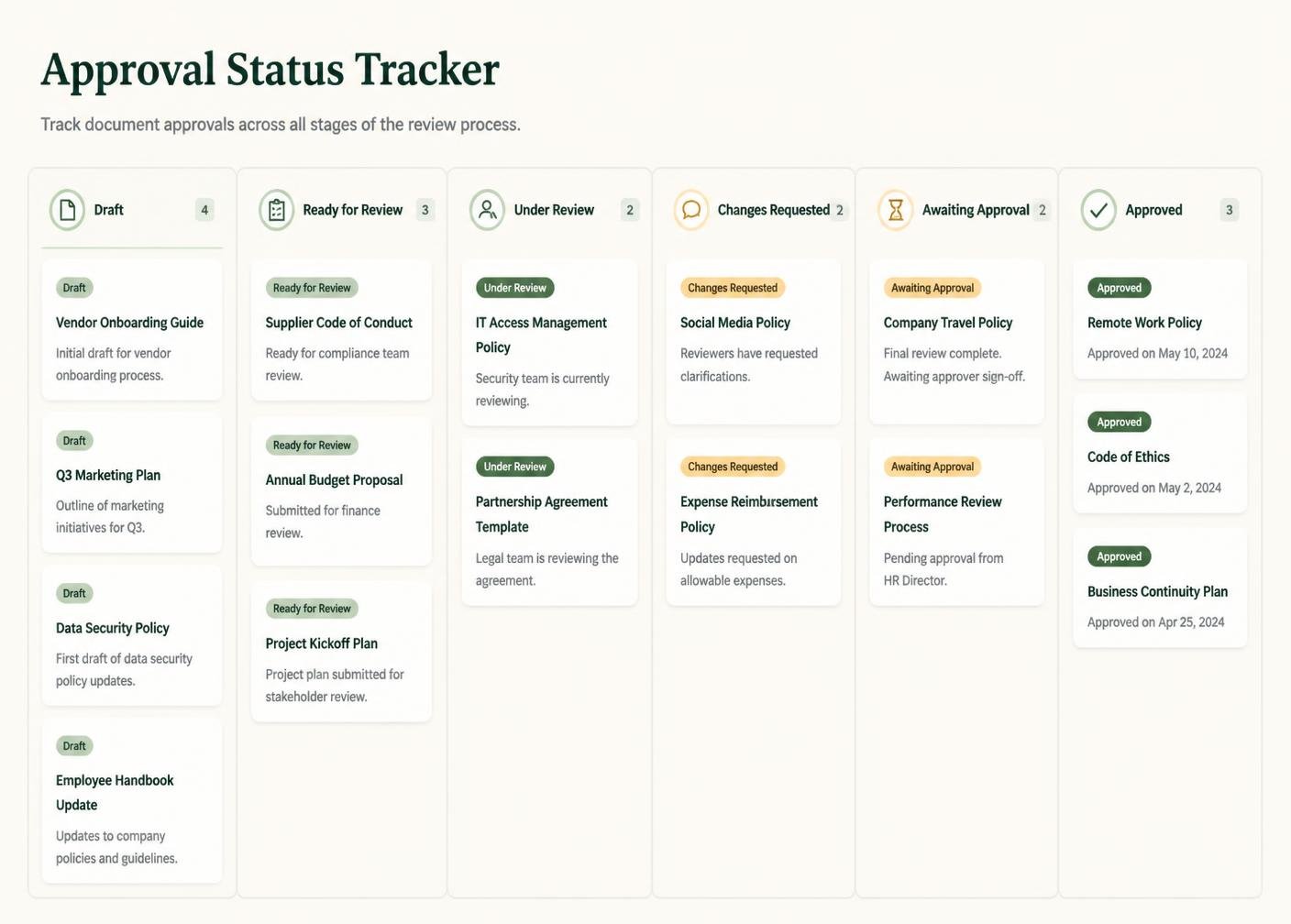
See which documents are in review, awaiting approval or approved.
Illustrative software preview · demonstration data
Features
Twelve practical tools appear across the ApproveTrail packages, depending on the capacity you choose.
A structured list of the documents currently in or awaiting review.
Choose which reviewers are involved in each document review.
Reviewer comments gathered in one thread against the relevant document.
Move a document through configurable review and approval stages.
A clear visual status for every document at every stage.
Each saved version kept as a separate, dated record.
A short explanation of what changed, saved alongside each version.
Record and view the date a review or approval is due.
Locate documents quickly by title, status, reviewer or category.
A summary view of approvals completed over a chosen period.
Shared access to review records for packages that include multiple users.
Instructions to help you configure your workspace after purchase.
How it works
A straightforward eight-stage path from choosing a package to your first completed review.
Compare the seven packages and pick the review capacity you need.
Add the package to your cart from any pricing card on the site.
Check the package and the one-time price before continuing.
Pay through Stripe's embedded payment interface on this website.
The confirmation page verifies the payment directly with Stripe.
Setup or access information is sent to your checkout email address.
Add your documents, reviewers and first approval stages.
Contact the owner directly with questions about access or configuration.
Who it is for
ApproveTrail suits independent professionals and small teams reviewing documents regularly.
Send proposals and deliverables for client feedback and keep the approval trail in one place.
Track report reviews, client feedback and sign-off across several engagements.
Organise design and copy reviews with clear reviewer comments and version records.
Share a document review structure across a small team.
Move deliverables through review stages with a visible approval status.
Keep client-facing document reviews organised and easy to search.
Coordinate reviewer feedback on campaign assets before they are approved.
Keep a simple, structured record of document approvals without a complex system.

Pricing
Seven packages are available in total. Every package is a one-time purchase in GBP with no automatic renewal.
Busy freelancers
£90 one-time
An expanded review package for professionals handling more documents, feedback and approval activity across several clients or projects.
One-time payment · No automatic renewal · Secure Stripe payment on this site
Most chosen
£140 one-time
A professional document-review package for users requiring larger review capacity, configurable approval stages and stronger reporting tools.
One-time payment · No automatic renewal · Secure Stripe payment on this site
Largest capacity
£695 one-time
A comprehensive one-time review and approval software package for established teams requiring larger capacity, advanced configuration and structured onboarding support.
One-time payment · No automatic renewal · Secure Stripe payment on this site
Why choose it
Pay once for the package you choose. There is no subscription and no recurring charge.
User allowances, review limits and document-record limits are listed before purchase.
The owner, address, contact details and business type are published openly.
Nothing renews on its own and no card details are stored by ApproveTrail.
Access or setup information is sent to the email address entered at checkout.
Enquiries are answered by the owner, normally within one business day.
Documents, feedback, versions and approval status held together consistently.
ApproveTrail is a workflow and approval-management tool. It does not provide legal advice, document certification, electronic-signature certification, regulated compliance services or any other professional legal service.
ApproveTrail is independently owned and operated by Tilak Giri as a sole trader in the United Kingdom.
Feedback
Reviewer comments and requested changes are recorded against the relevant document rather than scattered across email threads and chat messages. Each comment stays attached to the version it was made on, so nothing is lost when a new version is saved.
Approval status
Every document moves through a clear set of statuses so you always know where it stands.
Version history
Each time a document is revised and saved, ApproveTrail keeps the earlier version on record alongside the new one, together with a short revision note describing what changed. This gives you a clear, dated trail from the first draft to the approved version.

Deadlines
Record the date a review or approval is needed by, and see which documents are approaching or past that date. Deadline organisation is a record-keeping feature: ApproveTrail does not send automatic reminder emails and does not chase reviewers on your behalf.
Record the date agreed for a review or approval to be completed.
See which documents are approaching their review deadline.
Mark documents that have passed their agreed deadline.
Payments
Payments are completed using Stripe's secure embedded payment interface, displayed inside the ApproveTrail checkout page. Sensitive payment details are handled by Stripe and are not directly stored by ApproveTrail.

After purchase
The confirmation page checks your payment directly with Stripe.
You receive an order reference and a Stripe receipt may follow separately.
The selected package is reviewed against the details you entered at checkout.
Digital access or setup information is sent to your checkout email address.
You add documents, reviewers and your first approval stages.
Insights
Practical ways to keep reviewer comments attached to the right document and version.
A straightforward approach to moving documents through review stages without overcomplicating things.
Keeping earlier versions on record while making the current version obvious.
What each approval status means and when a document should move to the next stage.
Why scattered feedback channels cause delays and how to bring comments into one place.
How a short, consistent revision note saves time when reviewing document history.
FAQ
No. Every package is a one-time purchase in GBP with no automatic renewal.
Digital access or setup instructions are emailed to the address entered during checkout after payment is confirmed.
No. ApproveTrail is a workflow and approval-management tool. It does not provide legal advice, document certification, electronic-signature certification, regulated compliance services or any other professional legal service.
No. ApproveTrail organises the review and approval process; it does not guarantee approval or approve documents on your behalf.
No. ApproveTrail organises document reviews, feedback and approval records; it is not a real-time co-editing tool.
Yes. Contact us with your current package and what you now need, and the difference will be confirmed in writing.
Choose the ApproveTrail package that matches your reviewers, document volume and approval requirements.